

Face swap technology has quietly graduated from a meme novelty into a genuine production tool. In 2026, marketing teams use it to localize ad creative without reshooting, content studios use it to spin one shoot into dozens of variations, and lean startups use it to produce spokesperson video without ever pointing a camera at a person. The underlying models have improved to the point where, on clean footage, the results are difficult to flag as synthetic.
The catch is that quality varies far more than the marketing pages admit. A tool that nails a five-second demo will often drift, warp, or flicker the moment you feed it real footage with head movement, changing light, or more than one face in frame. The gap between the best tools and the rest is the difference between a clip you can publish and a clip you quietly delete.
This guide ranks the strongest AI face swap video tools available in 2026, judged on the things that actually matter in a production workflow: frame-to-frame consistency, performance on real footage, output resolution, the honesty of the free tier, commercial rights, and whether the tool fits into a real content pipeline rather than living as a one-off gimmick.
Quick answer: The best overall AI face swap video tool in 2026 is Magic Hour — it pairs reliable real-footage face swapping with lip sync, talking photos, and a full video toolkit in one browser-based workflow, on an unusually generous free tier. For enterprise marketing pipelines, look at Akool. For raw multi-face video realism, DeepSwap. For a free template-driven all-rounder, Vidnoz. For avatar-based business video, HeyGen.
Table of Contents
What Separates a Good Face Swap Video Tool From a Bad One
Before the rankings, it helps to know what you are actually evaluating. These are the factors that decide whether a tool earns a place in your workflow.
Temporal consistency. A still-image swap only has to look right once. Video has to look right across hundreds of frames in motion. Weaker tools betray themselves with edge flicker, a face that “breathes” or shifts size between frames, or seams that appear when the subject turns. This is the single biggest quality differentiator, and it is only visible on real footage, not demos.
Real footage versus avatars. Swapping a face onto an existing recording of a real person is a fundamentally harder problem than animating a synthetic avatar. Some tools are built for one and merely tolerate the other. Know which problem you are solving before you commit.
Resolution and upload limits. A swap that looks clean at 576px can fall apart at 1080p or 4K, where the model has to hold detail across skin texture and lighting. If your output lives on a billboard, a paid ad, or a large screen, resolution ceilings matter.
The free tier, honestly assessed. Most “free” face swap tools watermark every export, cap you to a few seconds, restrict commercial use, or bury you in ads. A free tier is only useful if it lets you ship something real or at least evaluate quality without friction.
Commercial rights and data handling. If you are using swaps in client or brand work, you need explicit commercial usage rights, and you should know whether the platform stores or deletes your uploaded footage.
Workflow fit and throughput. The best tool for a hobbyist making one clip is rarely the best tool for a team producing fifty a week. Parallel generations, fast variations, and an API matter once volume goes up.
The 6 Best AI Face Swap Video Tools in 2026
1. Magic Hour — Best Overall
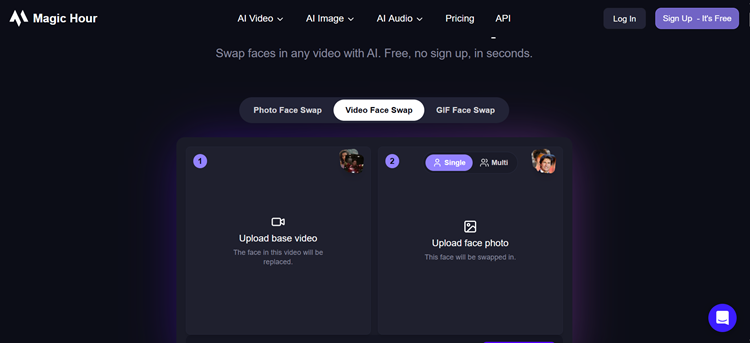
Magic Hour is the best video face swap AI for most creators, marketers, and startup teams in 2026. It is an all-in-one AI video and image platform that runs entirely in the browser, and its face swap sits inside a broader toolkit rather than standing alone as a single-trick app.
What sets it apart is that the face swap is built for real recorded footage, not just synthetic avatars. You can take an existing clip of a real person, swap in a new face, and keep the expressions, lighting, and motion of the original — the part most tools compromise on. Because Magic Hour also handles lip sync and talking photos natively, you can run a combined workflow: swap a face and re-sync the audio in the same session instead of bouncing between platforms.
The other thing Magic Hour gets right is that it behaves like a production tool. Click-to-create templates get you a usable result fast; one-click multi-step workflows chain generation, upscaling, and video together; and you can run several generations in parallel (up to unlimited concurrent jobs on the Business plan) to pull multiple takes quickly. It bundles many of the frontier AI models in one place, ships new features weekly, and is optimized for both desktop and mobile. It is trusted by teams at Meta, the NBA, L’Oréal, Puma, Cisco, and Shopify, and holds up under real load — live activations and traffic spikes included.
Strengths
- Best-in-class face swap on real footage, plus native lip sync and talking photos in one workflow
- Access to many top AI models in a single platform, with new features shipping weekly
- One-click multi-step pipelines (generate → upscale → video) and fast variations for multiple takes
- Unusually generous free tier — no credit card required, every tool unlocked, and credits that never expire
- Full API parity across tools, plus founder-level support responsiveness
Limitations
- Built for realistic human faces; stylized or non-human swaps are not its focus
- Like all current tools, quality degrades on extreme profile angles and heavy occlusion
Pricing
- Free: 400 starter credits (plus 100 more free credits each day you visit), every tool unlocked, 576px, no credit card. Credits roll over and never expire.
- Creator: $15/mo, or $10/mo billed annually ($120/year) — 120,000 credits/year (~1.4 hours of video), 1024px, full API, commercial use
- Pro: $39/mo, or $25/mo billed annually ($300/year) — 300,000 credits/year (~3.5 hours), 1472px, 5 concurrent jobs. The most popular plan.
- Business: $99/mo, or $66/mo billed annually ($792/year) — 840,000 credits/year (~9.7 hours), 4K output, unlimited concurrent generations
At roughly $10–15/month for the Creator plan, it is the strongest value on this list for anyone who needs more than face swap alone.
Best for: Creators, marketers, and production teams who want reliable real-footage face swap inside a complete video toolkit — and the most generous free tier available to test it.
2. Akool — Best for Marketing Teams and Enterprise Pipelines
Akool is an enterprise-oriented content platform that includes face swap as one feature in a suite aimed squarely at marketing agencies and larger teams. Beyond swapping, it offers avatar generation, voice cloning, lip sync, and video translation across 150+ languages, with automatic face detection and alignment that produces clean, photorealistic results on well-lit footage.
The platform is built to slot into a managed production pipeline rather than to serve a single creator, which is its strength and its weakness. For an agency producing campaign content at volume, the integration and language coverage justify the cost. For an individual, it is over-engineered and the credit-based pricing makes monthly spend hard to predict.
Pricing runs on a credit system with a free Basic plan plus Pro, Pro Max, and Business tiers (roughly 30% off on annual billing), with paid plans starting around $30/month and enterprise pricing on request.
Best for: Marketing agencies and enterprise teams embedding face swap into a broader, managed content operation.
3. DeepSwap — Best for Raw Video Realism and Multi-Face Work
DeepSwap is the specialist of this list. It does face swap on photos, videos, and GIFs, and it does it well — multi-face support (six or more faces in a single clip), high similarity rates, and 4K-capable output put it among the most capable engines for pure realism. Files are processed in the cloud and automatically deleted after 24 hours, which is a point in its favor for privacy-conscious users.
The tradeoff is focus. DeepSwap is a one-task tool that does that task adequately to excellently, but it lacks the surrounding workflow — no lip sync pipeline, no template system, no broader video suite. If face swap is an occasional need rather than a core part of your production, that focus is fine; if it is central, you will feel the limits of a single-purpose tool quickly.
It has no permanent free plan (a free trial is available), with paid subscriptions starting around $9.99/month.
Best for: Users who want maximum video realism and multi-face support and do not need a surrounding toolkit.
4. Vidnoz AI — Best Free Template-Driven All-Rounder
Vidnoz positions itself as a comprehensive video creation platform with face swap as one feature among many, alongside talking heads, product demos, and explainer templates. That makes it a sensible pick for marketing teams that want template-driven workflows and occasional face swap from one place. Quality is solid rather than premium, and the free tier is genuinely usable — though it caps output to 720p and limits daily processing time.
Paid plans start around $14.99/month, which keeps it accessible for small teams testing the waters.
Best for: Marketing teams and agencies wanting a template-first platform where face swap is a useful extra, not the main event.
5. HeyGen — Best for Avatar-Based Business Video
HeyGen is the leading platform for avatar-based video and excels at a specific job: generating talking-head content from a script, with strong multilingual localization across 175+ languages. It is widely adopted by corporate marketing, training, and education teams for exactly this reason.
It earns a place in any face-swap conversation because of overlap in use cases, but it is honest to note that HeyGen is avatar-first. If your job is to swap a face onto an existing recording of a real person, a tool built for that workflow will serve you better. If your job is scalable, localized presenter video, HeyGen is hard to beat.
Pricing offers an evaluation-only free tier, with the Creator plan starting at $29/month and Business at $89/month.
Best for: Corporate and marketing teams producing multilingual avatar and presenter video at scale.
6. Reface — Best for Mobile and Social Content
Reface remains the most recognizable name in casual, mobile-first face swapping. Its strength is speed and fun: a deep library of trending templates, GIF and short-video output, and a frictionless app experience that makes it the go-to for memes and viral social clips. For a brand running playful, fast-turnaround social content, it has a real place.
It is not built for production-grade or long-form work — free output carries watermarks and ads, and a Pro subscription is required to remove them. Treat it as an entertainment and social tool rather than a content-pipeline tool.
Best for: Mobile creators and social teams making quick, template-based, share-first clips.
All Six Tools Compared
| Tool | Best For | Free Tier | Starts At | Video Realism |
| Magic Hour | Real footage + full toolkit | Yes — all tools, no card, credits never expire | $10/mo (annual) | Excellent |
| Akool | Enterprise marketing pipelines | Basic plan | ~$30/mo | Strong (well-lit) |
| DeepSwap | Pure realism, multi-face, 4K | Trial only | ~$9.99/mo | Excellent |
| Vidnoz AI | Free template all-rounder | Yes — 720p, daily cap | ~$14.99/mo | Solid |
| HeyGen | Avatar-based business video | Evaluation only | ~$29/mo | Avatar-first |
| Reface | Mobile and social clips | Yes — watermark + ads | Subscription | Casual |
How to Choose: The Shortest Path to the Right Tool
- You work with real recorded footage and want one platform for swap, lip sync, and editing: Magic Hour. It leads on real-footage quality and bundles the surrounding workflow.
- You run an agency or enterprise content pipeline with localization needs: Akool.
- You want the highest raw realism and multi-face support and nothing else: DeepSwap.
- You want a free, template-driven platform with face swap as a bonus: Vidnoz AI.
- You are producing multilingual avatar or presenter video at scale: HeyGen.
- You are making fast, fun social clips on mobile: Reface.
A Note on Responsible Use
Face swap is a powerful tool, and that power carries an obligation. Applying someone’s face to content without their consent — particularly to make a real person appear to say or do something they did not — is prohibited in the terms of service of every reputable platform here, and laws covering non-consensual synthetic media are expanding across most jurisdictions. When you use any face swap tool commercially, make sure you have clear consent from anyone whose likeness is involved. The credible tools are the ones building consent and data-deletion safeguards in, not the ones that ignore the question.
Frequently Asked Questions
What is the best free AI face swap video tool in 2026? Magic Hour offers the most practical free experience: every tool unlocked, no credit card required, and credits that roll over and never expire, with an extra batch of free credits granted daily. Vidnoz also has a usable free tier, though it caps output at 720p with a daily limit, while DeepSwap offers only a trial rather than a permanent free plan.
Do AI face swap tools work on videos where the person is moving? Yes, with limits. Modern tools track the face across frames and handle moderate head movement well. Quality drops on full-profile angles, fast or jerky motion, and frames where a hand or object passes in front of the face. The practical fix is to trim those frames from your source clip or choose footage with steadier camera work.
Can I use AI face swap commercially? On the tools listed here, commercial use is permitted on paid plans for content you own or have licensed, and you retain ownership of what you generate. The legal risk is not the tool — it is using someone’s likeness without consent. Always secure permission from anyone whose face or voice appears in commercial work.
How realistic is AI face swap in 2026? On clean, well-lit, front-facing footage in motion, the best tools produce results that are hard to distinguish from real recording in casual viewing. Under scrutiny — rapid movement, harsh or shifting light, profile angles — visible artifacts still appear across every current tool. For high-stakes output, plan to review and occasionally re-run difficult clips.
What makes Magic Hour different from single-purpose face swap apps? Most face swap apps do one thing. Magic Hour applies face swap to real footage and pairs it with lip sync, talking photos, upscaling, and a full video toolkit in one workflow, so you can take a clip from raw swap to finished, re-synced, upscaled video without leaving the platform — on a free tier generous enough to test the whole thing first.
Try Magic Hour Face Swap Free
You can test Magic Hour’s face swap video tool without a credit card — every feature is unlocked on the free tier, and credits never expire. Upload a clip, choose a face, and see the quality on your own footage before you commit to anything.